








Best Gaming Desks With Built-In Cable Management
Every gamer knows the feeling: you finally get your dream setup assembled, lean back to admire it — and there's a spaghetti nightmare of cables hanging off the back of your desk. Power bricks dangling mid-air. HDMI cables stretched across open space. A USB hub balanced precariously on nothing. It doesn't just look bad; it creates real problems. Cables snag, peripherals disconnect at the worst moments, and cleaning around the mess becomes a project of its own.
The solution isn't a drawer full of velcro ties — it's a gaming desk with built-in cable management designed to hide, route, and organize your cables from the ground up. The right desk handles the chaos so you can focus on what matters: performance. In this guide, we break down exactly what features to look for, explain the different types of cable management systems available, and show you how Blacklyte's Atlas Desk lineup approaches cable organization with engineering-grade intent.
Why Cable Management Matters More Than You Think
A clean desk isn't just about aesthetics — though that's a genuinely valid reason. Proper cable management affects airflow around your tower, reduces wear on cable connectors, and lowers the risk of accidental disconnections mid-game. When cables are routed cleanly and secured away from your work surface, you also get more usable desk real estate, which translates to more mousepad space, better monitor placement, and a more comfortable setup overall.
There's also a practical safety dimension. Cables running across the floor or dangling from desk edges create tripping hazards, especially in a dark room during a late-night session. A desk with integrated routing channels and power management keeps everything tucked and tensioned correctly, reducing strain on connectors and prolonging the life of your peripherals. It's one of those investments that pays off every single day you sit down to play.
What to Look for in a Gaming Desk With Built-In Cable Management
Not all cable management systems are created equal. Some desks offer little more than a single pass-through hole in the surface — which helps slightly, but doesn't solve the underlying problem. A genuinely well-engineered gaming desk integrates cable management across multiple dimensions. Here's what separates a thoughtful system from a token feature:
- Cable routing channels: Dedicated channels or raceways built into the desk frame or underside that guide cables from your peripherals to a central exit point, keeping everything off the surface and out of sight.
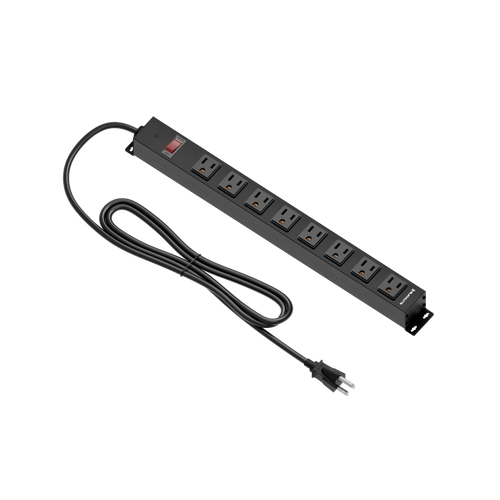
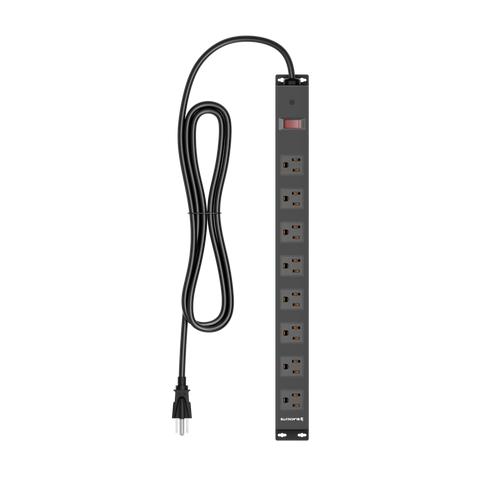
- Built-in power box: A built-in power box with mains sockets means fewer cables running to a wall outlet and a single, managed power source for your entire setup.
- Under-desk cable tray or spine: A tray, spine, or cradle mounted beneath the desktop that collects and holds excess cable length, preventing floor drag.
- Grommet holes or pass-throughs: Reinforced openings in the desk surface that allow cables to drop cleanly to the underside without fraying edges or awkward angles.
- Desk depth and surface area: A deeper desk gives you more space to push peripherals back and keep cables away from your primary work zone.
- Stability of the frame: A wobble-free desk keeps cables from pulling and shifting at connection points — structural rigidity and cable management work hand in hand.
When you evaluate desks using these criteria together rather than checking a single box, the difference between a desk that manages cables and one that simply acknowledges them becomes immediately clear. The best options — especially those built with gaming environments in mind — treat cable organization as a core engineering priority, not an afterthought.
Types of Built-In Cable Management Features Explained
Understanding the different approaches helps you match a desk to your specific setup complexity. A single-monitor, minimal peripheral setup has very different cable demands than a triple-monitor battlestation with a tower, multiple USB hubs, headset stands, and RGB lighting controllers.
Cable Spine Systems
A cable spine is a vertical or diagonal channel — often running along the back leg of the desk — that consolidates cables from the desktop surface down to the floor in a single, clean bundle. This approach is particularly effective for standing desks, where cables need to flex and move without tangling as the height adjusts. A well-designed spine keeps the cable bundle tight during height transitions so nothing catches or pulls at the connection points.
Under-Desk Cable Trays
Mounted beneath the desktop, cable trays act as a holding zone for excess cable length, power bricks, and any cable organization accessories like splitters or hubs. Rather than piling everything on the floor, a tray keeps the underside of your desk structured. Look for trays that are wide enough to hold a power strip and deep enough to contain larger adapters — a narrow tray quickly becomes just as chaotic as the floor.
Integrated Power and On-Desk Sockets
This is the premium tier of cable management, where the desk itself becomes part of your power infrastructure. Desks with a built-in power box and mains sockets dramatically reduce the number of separate cables running to your wall outlet. Everything that once required its own plug-in now connects to a single managed source at the desk — cleaner, simpler, and far easier to switch off at the end of the night.
Desk Surface Pass-Throughs
Grommet-style holes or slotted pass-throughs in the desk surface allow cables to drop from above the desk to below it in a controlled, reinforced way. Higher-quality implementations use plastic or rubber grommets to protect cables from sharp edges and allow smooth routing even for thicker cables like heavy-duty power cables.
The Blacklyte Atlas Desk: Cable Management Built for Serious Setups
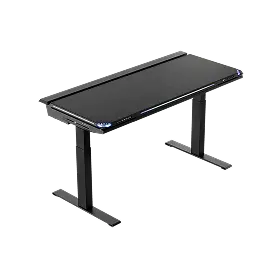
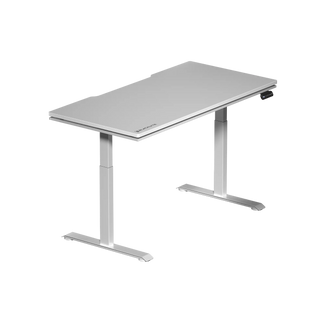
Blacklyte's Atlas Desk and Atlas Lite Standing Desk were engineered with a simple premise: a gaming or work setup should look as good as it performs. That philosophy shows in how comprehensively each desk handles cable organization. Rather than retrofitting a basic desk with a cable hole, Blacklyte built cable management into the Atlas Desk's core architecture from the start.
The Atlas Desk features a built-in electrical socket — an integrated power strip that brings mains sockets to the desk (it distributes power rather than supplying it, and there's no USB) — eliminating the need for a separate floor-level power strip and the cable runs that come with it. The Atlas Lite has the same power module, just with a few fewer lighting-control ports. Combined with built-in cable management routing that channels cables cleanly from your peripherals to a single exit point, the Atlas keeps your surface clear without sacrificing flexibility. The desk also incorporates magnetic surface elements and smart lighting controls through Blacklyte's proprietary Atlas Driver software — meaning the lighting cables and control connections are already accounted for in the design, not crammed in afterward.
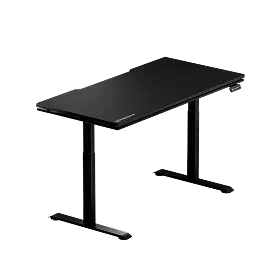
For setups that benefit from height flexibility, the Atlas Lite Standing Desk extends these same cable management principles into a height-adjustable frame. As the desk moves between sitting and standing heights, the cable spine and routing system flex with it — no tangling, no pulling, no cables catching on the frame mid-adjustment. For anyone building a performance workstation that needs to support both intense gaming sessions and productive work hours, the Atlas lineup's approach to cable infrastructure is in a category of its own. You can compare both Atlas models side by side to see which configuration fits your space and workflow.
Backed by Blacklyte's 20 years of gaming furniture expertise and trusted by over 200,000 gamers across 50+ Countries & Regions, the Atlas Desk isn't positioned as a generic office desk with RGB — it's a purpose-built gaming surface that treats cable management as seriously as structural integrity.
Standing Desks and Cable Management: A Special Challenge
Height-adjustable standing desks introduce a cable management challenge that static desks don't face: movement. Every time you adjust the height, every cable attached to your setup has to accommodate that range of motion. A desk that rises 15–20 inches requires cables with enough slack to move freely — but too much slack means excess cable pooling on the floor or bunching under the desk when you're at seated height.
The solution is a cable management system specifically designed for dynamic use. A flexible cable spine that runs along the desk leg keeps the cable bundle organized and tensioned across the full height range. Under-desk trays with retaining clips prevent cables from sliding or pooling as the desk moves. And integrated power solutions reduce the total number of cables that need to flex with the desk in the first place — fewer cables moving means fewer opportunities for tangles or disconnections. If you're considering an ergonomic standing desk setup, Blacklyte's ergonomics resource hub is worth exploring for guidance on building a workspace that performs across both positions.
Pro Tips for Maximizing Your Desk's Cable Management System
Even the best built-in cable management system works better with a few deliberate habits. The desk provides the infrastructure; how you use it determines the result.
- Measure cable lengths before routing: Use cables that are just long enough to reach their destination cleanly. Oversized cable lengths force you to coil excess, which creates bulk even inside a well-designed tray.
- Group cables by destination: Route all monitor cables together, all USB cables together, and power cables together. Mixing cable types makes future troubleshooting unnecessarily complicated.
- Use Velcro straps rather than zip ties: Velcro allows you to adjust or remove cables without cutting anything — essential when you inevitably upgrade a peripheral or reroute a connection.
- Label your cables at both ends: In a complex setup, knowing which cable does what without tracing it across the desk saves serious time during any hardware changes.
- Revisit your routing every few months: Setups evolve. Cables that made sense six months ago may be redundant or reroutable now. A periodic cable audit keeps the system clean as your gear changes.
Good habits combined with a desk engineered for cable management create a setup that stays organized long-term — not just on day one when everything is freshly routed. It's the difference between a setup that photographs well once and one that performs beautifully every session. For more guidance on building an ergonomic, high-performance battlestation, visit Blacklyte's Gaming Hub.
Frequently Asked Questions
What is the most important cable management feature in a gaming desk?
A built-in power box with mains sockets has the biggest single impact, because it reduces the number of individual cables running from your desk to the wall. Once that's handled, a cable spine or under-desk tray takes care of the remaining routing. Prioritize power management first, then surface routing.
Can I add cable management to a desk that doesn't have it built in?
Yes — aftermarket cable trays, adhesive cable clips, and floor-mounted cable covers can meaningfully improve an unmanaged setup. However, retrofitted solutions are always a compromise compared to built-in systems, because they attach to the desk externally and don't integrate with the desk's structure. If cable management is a priority, it's worth selecting a desk that includes it natively.
Do standing desks need different cable management than fixed desks?
Yes. Standing desks require cables with enough slack to accommodate the full height range, plus a routing system — typically a cable spine — that keeps the bundle organized during movement. Fixed desks don't need to account for that vertical travel, so their cable management can be tighter and more static.
How does the Blacklyte Atlas Desk manage cables?
The Atlas Desk integrates a built-in electrical socket (an integrated power strip, shared with the Atlas Lite — no USB), dedicated cable routing channels, and magnetic surface elements that account for lighting and control connections natively. The Atlas Driver software manages smart lighting controls, meaning those connections are built into the desk's design rather than added on top. The Atlas Lite Standing Desk extends these features into a height-adjustable frame with a flexible cable system designed for dynamic use.
The Bottom Line
A tangled desk isn't a minor aesthetic issue — it's a performance problem, a maintenance headache, and a daily reminder that your setup isn't working as hard as it could. The best gaming desks with built-in cable management solve this at the source, integrating power supply, routing channels, cable spines, and pass-throughs directly into the desk structure so organization is the default, not something you have to fight for.
Blacklyte's Atlas Desk and Atlas Lite Standing Desk represent what cable management looks like when it's treated as a first-class engineering priority rather than a checkbox feature. Whether you're building a compact single-monitor setup or an expansive multi-display battlestation, having the right desk infrastructure underneath it all makes every session cleaner, quieter, and more focused. Explore the full Blacklyte desk lineup and see what a purpose-built gaming surface actually looks like — or browse the complete Blacklyte collection to build your entire setup from the ground up.
Ready to build a setup that's as clean as it is capable? Our team is here to help you find the right desk, chair, and accessories for your space and playstyle.
Contact Us