









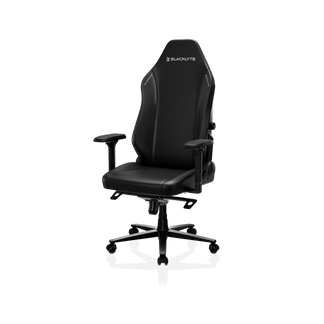
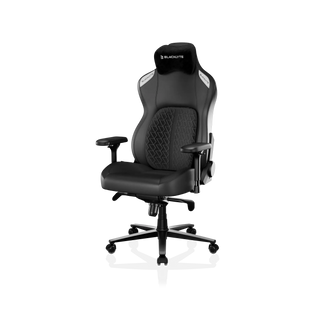



Day after day, your gaming chair takes a little wear. The seat might soften. A faint squeak might appear. Certain areas could look worn. Nothing is broken, but it’s not like new. Many people think it’s time for a replacement. But most gaming chairs aren’t cheaply made. Daily habits, room conditions, and small and unnoticed stresses cause most wear. With a quality computer gaming chair, taking simple steps to care for it can extend the lifespan of your gaming chair.
What Affects Gaming Chair Lifespan (Materials, Usage & Environment)
There isn’t a single reason a gaming chair wears out. It’s more like a combination of factors quietly working in the background. Material is the obvious one. PU leather, fabric, mesh—they all age differently. PU leather tends to show wear more clearly, especially if it dries out. Fabric doesn’t crack, but it collects dust and slowly loses its feel. Mesh usually holds shape well, but only if the structure underneath is solid.
Then there’s how often the gaming chair is used. A chair that sees a couple of hours on weekends won’t age the same way as one used eight or ten hours a day. That part is pretty straightforward. What’s less obvious is how much habits matter. Sitting slightly off-center, leaning more on one side, or putting weight on the armrests—none of these feels like a big deal in the moment.
But over time, they create uneven stress. The environment plays its part too. Sunlight, humidity, and even dust in the room. It doesn’t destroy a gaming chair overnight, but it changes how materials hold up over months and years.
Daily Habits & Do / Don’t: Extend Your Gaming Chair Lifespan
Do: Key Habits
1. Sit fully back in the gaming chair with even weight distribution to prevent uneven seat compression.
2. Keep a relaxed, consistent posture instead of leaning forward or sitting on the edge.
3. Sit down gently—avoid dropping your full weight into the gaming chair to reduce strain on the gas lift and frame.
4. Stay within the gaming chair’s weight limit to protect the base and internal components.
5. Fix small issues early (squeaks, loose screws, or wobbly parts) to prevent bigger problems.
Don’t: Common Mistakes
1. Don’t sit on the edge or armrests for long periods.
2. Don’t use armrests to support your full body weight when standing or leaning.
3. Don’t overload the gaming chair beyond the manufacturer’s weight limit.
4. Don’t ignore unusual sounds or instability; these are early warning signs of wear.
Gaming Chair Maintenance Tips: Cleaning, Protection & Lubrication
Cleaning a computer gaming chair doesn’t sound important until you skip it for a while. Dust builds up. So does sweat, even if you don’t notice it. Over time, that affects how materials behave—surfaces dry out, fabric feels rough, and small imperfections become more obvious.
Regular Cleaning Routine
|
Material / Part
|
Frequency
|
Method / Tip |
|
PU Leather Gaming Chair Surface
|
Weekly
|
Wipe with microfiber cloth; mild soap if needed; avoid alcohol. Optional: use Blacklyte gaming chair leather cleaner & conditioner for protection.
|
| Fabric / Mesh Gaming Chair Surface | Weekly | Vacuum with handheld device; use lint roller for pet hair or debris. |
| Gaming Chair Wheels & Axles | Every 2–3 weeks | Remove hair and dust buildup to ensure smooth rolling and prevent strain on the base. |
Protect the Upholstery
Different materials react differently. PU leather doesn’t do well with strong cleaners or alcohol-based products. Those tend to dry it out faster. Keeping things gentle actually works better in the long run. Fabric benefits from basic protection too. Even something simple like reducing dust exposure makes a difference over time.
Lubricate Moving Parts
If your computer gaming chair starts making noise, it’s usually trying to tell you something. Squeaks often come from friction in joints or mechanisms. A bit of lubricant in the right place—tilt mechanism, joints, wheel axles—can fix it quickly. It’s one of those small fixes that’s easy to ignore, but worth doing early.
Protect Your Gaming Chair from Environmental Damage
The setup around your chair matters more than people expect. Try to keep your chair out of direct sunlight for more than 2–3 hours daily. Even a few hours of daily exposure can gradually dry out PU leather, leading to cracks that are hard to reverse. Humidity works differently. Humidity above 70% may cause fabric to absorb moisture, leading to odor. Metal parts don’t always react well either.
Even the floor can play a role. If the chair doesn’t roll smoothly—because of rough surfaces or uneven ground—extra stress goes into the base and wheels. Use a mat on an uneven floor to prevent wheel wear. None of these factors is extreme. But together, they influence how quickly wear shows up.
Quick Checklist: Keep Your Gaming Chair in Good Shape
If you don’t want to remember everything, this is the part that matters most.
- Wipe down your gaming chair at least once a week
- Avoid sitting on the edge for long periods
- Don’t use armrests to support your full body weight
- Sit down with control instead of dropping into the gaming chair
- Keep your gaming chair out of direct sunlight
- Check and tighten screws every 1–2 months
- Clean hair and debris from the wheels regularly
- Apply lubricant if you hear squeaking
Why Investing in a High-Quality Gaming Chair Matters
Even with good habits, not all gaming chairs age the same way. Better materials hold their shape longer. Stronger frames stay stable instead of slowly loosening. Components don’t wear out as quickly under the same conditions. That’s usually where higher-end gaming chairs separate themselves—not in the first few weeks, but after months of daily use.
Brands like Blacklyte, with a 5-year warranty, tend to focus on that long-term side of performance. Not just how a gaming chair feels at the start, but how it holds up over time, especially with regular use. There’s also the practical side. A premium gaming chair that lasts longer—and comes with solid warranty support—often ends up being the more cost-effective option, even if the upfront price is higher.
FAQs About the Lifespan of Gaming Chairs
1. How long can a gaming chair last?
With proper care, a quality gaming chair can last 5–7 years or more. Lifespan depends on materials, build quality, and daily usage habits.
2. Why does my gaming chair keep sinking?
Sinking is usually caused by a gas lift issue, which is common in most chairs. Staying within the weight limit and gentle use helps prevent it.
3. How do I safely clean PU leather gaming chairs?
Use a soft cloth with mild soap and water, or you can use Blacklyte gaming chair leather cleaner and conditioner. Avoid harsh chemicals or alcohol, which can dry out the leather and cause cracks.
4. How can I prevent my gaming chair from wearing out quickly?
Sit properly, avoid overloading, maintain regularly, and keep it out of direct sunlight. Small daily habits greatly extend its lifespan.
5. How often should I maintain my gaming chair?
Wipe weekly, vacuum fabric weekly, clean wheels every 2–3 weeks, lubricate joints as needed, and tighten screws every 1–2 months.
6. Why choose Blacklyte gaming chairs over other brands?
Blacklyte gaming chairs are built with premium materials and reinforced frames for long-lasting comfort and durability. They come with a 5-year warranty, giving you extra assurance.
Conclusion
There isn’t a single trick to extend the lifespan of your gaming chair. It’s more about consistency than anything else. Sitting in a way that doesn’t put stress on one area. Cleaning it just enough so things don’t build up. Fixing small issues before they turn into bigger ones. Individually, none of these things feels important. But over time, they’re exactly what determines whether a gaming chair lasts a couple of years—or a lot longer than expected. And considering the cost of replacing one, that difference adds up.


