












The best gaming chair is not simply the one with the highest gaming chair weight capacity. It should match your height, weight, seat width, backrest height, and support needs. A chair that is too small can cause pressure points, poor posture, and discomfort during long sessions, while a chair that is too large may fail to provide proper lumbar and neck support. When choosing a gaming chair, look for a model that supports your weight comfortably, allows your feet to rest flat on the floor, and provides adequate back and shoulder support for your body size.
Why Height and Weight Matter More Than Most Buyers Realize
One of the most common questions gaming chair buyers ask is, “Will this chair fit me?” Based on customer feedback across the gaming furniture industry, many comfort complaints have little to do with chair quality. The real issue is often a mismatch between the chair's dimensions and the user's body type.
A gaming chair that feels perfect for someone who is 5'8" and 160 lbs may feel restrictive for someone who is 6'3" and 260 lbs. Your height and weight affect:
- Seat comfort
- Lumbar support positioning
- Neck and head support
- Leg circulation
- Armrest alignment
- Overall posture during long sessions
This becomes even more important for gamers, remote workers, and creators who spend 6–10 hours per day at their desks.
Understanding Gaming Chair Weight Capacity
Many buyers focus exclusively on the listed weight limit, but gaming chair weight capacity is only one piece of the puzzle.
| Weight Capacity | Typical User Profile |
| Up to 250 lbs | Average-sized users |
| 250-300 lbs | larger users needing additional support |
| 300-400 lbs | Big and tall users |
| 400 lbs+ | Heavy-duty specialized chairs |
A chair rated for 300 lbs does not necessarily mean it is ideal for every person under that limit. Seat width, frame design, cushion density, and lumbar support all influence comfort. For example, a user weighing 240 lbs may technically fit a chair with a 300-lb rating, but if the seat is narrow, long gaming sessions can still become uncomfortable.
How Height Affects Gaming Chair Fit
Height plays a major role in ergonomic support.
For Users Under 5'7"
Shorter users often struggle with chairs designed for taller individuals. Common issues include:
- Feet not touching the floor
- Lumbar support sitting too high
- Headrest pushing the neck forward
- Excessive seat depth
Look for:
- Adjustable lumbar support
- Lower seat height range
- Moderate seat depth
- Adjustable headrest positioning
For Users Between 5'7" and 6'0"
Most standard premium gaming chairs are designed around this height range. The key is finding a chair that offers:
- Proper lumbar alignment
- Adjustable armrests
- Comfortable seat depth
- Adequate recline options
Many ergonomic models in the premium category fit this range comfortably.
For Users Over 6'0"
Tall gamers face different challenges. A chair that is too short can leave the shoulders unsupported and place the headrest below the neck.
Look for:
- Extended backrest height
- Wider seat dimensions
- Higher weight capacity
- Larger lumbar adjustment range
This is where a dedicated big and tall gaming chair often becomes the better option.
How Weight Influences Long-Term Comfort
Weight affects more than structural durability. It also impacts how the foam, seat base, and support system perform over time. A higher-quality chair should include:
- High-density foam
- Durable steel frame construction
- Strong gas lift mechanism
- Reinforced wheelbase
Many low-cost gaming chairs lose support after months of use because their cushioning compresses too quickly. For users above 220 lbs, investing in stronger materials often delivers noticeably better comfort over the long term.
Gaming Chair Size Guide by Body Type
| Body Type | Recommended Features |
| Small Frame | Compact seat, lower seat height, adjustable lumbar |
| Average Build | Standard ergonomic gaming chair with adjustable support |
| Tall User | High backrest, extended seat depth, adjustable headrest |
| Broad Shoulders | Wide backrest and seat base |
| Big & Tall | Higher weight capacity, reinforced frame, wider cushion |
The goal is not to choose the biggest chair available. Instead, choose the chair that aligns most closely with your body dimensions.
Signs a Gaming Chair Is Too Small
Many gamers ignore these warning signs until discomfort becomes obvious. A chair may be too small if:
- Your shoulders extend beyond the backrest wings
- Your thighs feel compressed
- The seat edges press against your hips
- The headrest sits below your neck
- Armrests feel too close together
Over time, these issues can contribute to fatigue and poor sitting posture.
Signs a Gaming Chair Is Too Large
Bigger is not always better. A chair may be oversized if:
- Lumbar support cannot reach your lower back
- Seat depth prevents you from sitting fully back
- Armrests sit too far apart
- Your head does not contact the headrest properly
An oversized chair can reduce ergonomic benefits even if the build quality is excellent.
What We Recommend for Long Hours of Gaming and Work
At Blacklyte, many customers are not just gamers. They are remote workers, creators, students, and professionals who spend most of their day seated. For buyers seeking ergonomic support during long sessions, adjustable lumbar systems, high-density foam cushioning, and properly sized seat dimensions are often more important than appearance alone. Explore Blacklyte's gaming chair collection.
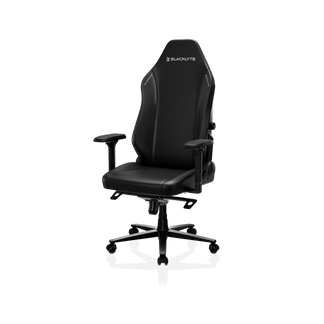
For users seeking advanced ergonomic features, the Athena Pro Gaming Chair offers adjustable lumbar support, 4D armrests, memory foam comfort, and a premium structure designed for long sitting sessions.
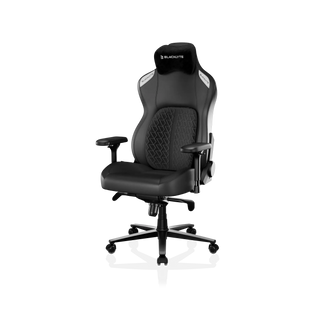
Larger users looking for additional room and support may benefit from the Kraken Pro Gaming Chair, which provides a wider seating experience and stronger ergonomic positioning.
Key Takeaways
Choosing a gaming chair based on height and weight is one of the most effective ways to improve comfort and posture.
Remember these principles:
- Weight capacity is important, but not the only factor.
- Match seat width and seat depth to your body size.
- Taller users need higher backrests and larger dimensions.
- Bigger users benefit from wider seats and reinforced support systems.
- Adjustable lumbar support helps accommodate a wider range of body types.
- The right fit will always feel more comfortable than simply choosing the largest chair available.
A gaming chair should support your body for years of gaming, working, and creating—not just look good in your setup.


