




















Your gaming room is more than a place to play — it's where performance happens, where hours disappear, and where your entire setup either works for you or fights against you. Whether you're working with a spare bedroom, a basement, a studio apartment corner, or a dedicated esports-style space, the right combination of layout, lighting, and storage can completely transform the experience.
But great gaming rooms don't happen by accident. They're built around decisions: where the desk goes, how the light hits the screen, where the cables hide, and — critically — whether the chair and desk actually support the body through long sessions. This guide covers 30 gaming room ideas across every major category, with practical advice you can act on today regardless of your budget or square footage.
Why Your Gaming Room Setup Matters
A well-designed gaming room isn't just aesthetic — it directly impacts how long you can play comfortably, how focused you stay, and how immersive the experience feels. Competitive players know this instinctively: tournament organizer BLAST and top-tier esports organizations like Team Liquid and Fnatic don't leave setup details to chance. The same logic applies at home. Poor monitor placement causes neck strain. Cluttered cables become a distraction. Bad lighting leads to eye fatigue. Getting these fundamentals right means more time in the game and less time nursing an aching back.
Gaming Room Layout Ideas
Layout is the foundation everything else builds on. It determines viewing angles, access to peripherals, how you manage cables, and even how the room feels psychologically when you sit down to play. Here are eight layout approaches that work across different room sizes and gaming styles.
1. Single-Monitor Command Center
The classic focused setup. A single large monitor (27–32 inches) positioned at arm's length, a quality desk with enough surface area for a keyboard, mouse, and accessories, and a high-performance chair centered in front. This layout prioritizes clean sight lines and minimal distraction — ideal for competitive FPS and strategy players who don't want peripheral clutter pulling attention away from the screen. Keep the monitor at eye level with the top of the screen roughly at or just below eye height to protect your neck over long sessions.
2. Triple-Monitor Immersive Setup
Three monitors mounted on a unified arm system create a panoramic field of view that's especially popular for sim racing, flight sims, and open-world RPGs. The key is getting the side monitors angled correctly (typically 15–30 degrees inward) and ensuring your desk is wide and sturdy enough to support the weight and visual load. A depth of at least 80 cm on the desk surface gives you space to position the main monitor at the right distance without crowding your keyboard.
3. L-Shaped Corner Battlestation
Corner setups make exceptional use of dead space while creating a wraparound feel that genuinely increases immersion. One wing handles the main gaming station; the other becomes a secondary display, streaming gear, or reference monitor. L-shaped configurations also naturally encourage good posture because you tend to sit centered in the corner rather than slumping to one side. If you're using a standalone desk rather than a dedicated corner unit, pairing two desks at 90 degrees with a corner bracket is a flexible and often more ergonomic option.
4. Shared Work-and-Play Layout
Not everyone has a room devoted exclusively to gaming. A dual-purpose layout separates the work zone from the gaming zone visually without requiring a separate room. A height-adjustable standing desk handles both — you work at sitting height during the day, shift the desk up for a standing work break, and then drop back down for an evening gaming session. The key is organizing the desk surface so you're not shuffling gear between modes. A monitor arm that adjusts between tasks helps enormously here. Explore Blacklyte's standing desk range for setups engineered around this dual-use philosophy.
5. Small Room and Bedroom Gaming Nook
Space constraints don't mean compromising on setup quality — they mean prioritizing ruthlessly. In small rooms, wall-mounted monitors free up surface area. Compact desks with vertical storage (shelving above the desk surface) maximize vertical space. A chair with a smaller footprint that still delivers proper lumbar and neck support is non-negotiable; cramped setups that lead to poor posture cost you far more in discomfort than you'd save by cutting corners on seating. Position the desk near natural light but perpendicular to windows to avoid glare.
6. Dedicated Console and Couch Setup
Console gaming calls for a different spatial logic. The TV goes on the wall at a height that lets you view it comfortably from a seated or reclined position — typically 40–60 inches from the floor depending on your seating height. A media console below the screen houses consoles, storage, and audio equipment. The couch or gaming sofa should sit far enough from the screen that viewing is comfortable (1.5–2.5x the screen's diagonal measurement is a common guideline), with side tables for controllers and headsets within easy reach.
7. Standing Desk Hybrid Layout
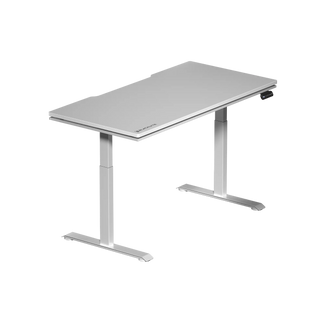
A height-adjustable desk transforms a static gaming room into a dynamic one. Some players prefer to stand during warm-up or casual browsing and sit for serious ranked play — and a motorized desk makes switching effortless. The Blacklyte Atlas Standing Desk lineup features an integrated power system and built-in cable management, while the Atlas adds a magnetic surface for accessory mounting and smart lighting controls through the Atlas Driver software, making it particularly well-suited to hybrid setups where you want a clean, adaptable surface without constant reconfiguration.
8. Streaming Studio Layout
Streaming setups have a visual dimension that pure gaming rooms don't. Your background matters. A streaming layout typically features the main gaming station front-and-center, with lighting positioned to flatter the streamer on camera, collectibles or themed wall art arranged deliberately in the background, and acoustic panels reducing room echo for cleaner audio. Desk layout needs to accommodate a capture card, audio interface, stream deck, and camera mount without feeling chaotic. Cable management becomes even more critical here — viewers notice clutter.
Gaming Room Lighting Ideas
Lighting in a gaming room does two jobs simultaneously: it creates atmosphere and it protects your eyes. The best gaming room lighting setups layer multiple light sources so you're never staring at a single bright screen in a pitch-dark room — one of the fastest routes to eye strain and headaches during long sessions.
9. RGB LED Strips Behind Monitors and Desks
The most common gaming lighting choice for good reason. LED strips adhered to the back of a monitor or along the underside of a desk shelf create a soft glow that reduces contrast between the bright screen and dark surroundings. RGB options let you match the lighting to your game, your team colors, or your mood.
10. Bias Lighting for Eye Comfort
Bias lighting is specifically designed around eye health rather than aesthetics, though the two aren't mutually exclusive. A strip of neutral or warm-white light placed directly behind a monitor reduces the perceived contrast between the screen and the room, which significantly decreases eye fatigue during extended sessions. For optimal results, the bias light should be roughly 10% of the screen's peak brightness and positioned so the glow is visible around the monitor edges but not reflected directly on the screen surface.
11. Smart Ambient Lighting Panels
Modular light panels (like those from Nanoleaf or similar brands) mount to walls and can be arranged in virtually any geometric pattern. They function as both art and lighting, letting you create custom shapes, change colors with voice commands or app controls, and synchronize with music or games. They work especially well on side walls in a gaming room — visible but not directly in your line of sight, contributing ambient color without causing glare.
12. Neon Signs and Custom Light Art
Custom LED neon signs have become a staple of content-creator and gaming room aesthetics. They can display usernames, favorite game quotes, clan logos, or purely abstract shapes. Modern LED neon (as opposed to traditional glass neon) is lightweight, cool to the touch, energy-efficient, and safe for bedroom use. Position them on a rear or side wall where they read clearly in streams and photos without washing out your main screen area.
13. Ceiling Lighting That Sets the Mood
Overhead lighting is often overlooked in gaming room design but it shapes how the entire space feels. Recessed LED downlights on a dimmer give you full control over ambient brightness. Star projectors cast a galaxy ceiling effect that's become enormously popular for immersive atmosphere in darker play sessions. For rooms with exposed beam ceilings or a loft aesthetic, uplighting along the walls creates dramatic depth without a single ceiling fixture.
14. Under-Desk and Floor Glow Lighting
Under-desk LED lighting creates a floating effect that makes the entire setup look intentional and polished. Floor glow strips can outline the desk area, trace cable paths, or frame the gaming zone with a subtle boundary of colored light. This kind of lighting reads especially well in photography and video, which matters if you're building a setup you want to share. It also serves a practical function: providing enough ambient light near your feet that you don't feel like you're sitting in a cave.
15. Smart Desk-Integrated Lighting
Some desks now come with integrated lighting built directly into the structure. The Blacklyte Atlas Standing Desk includes smart lighting controls managed through the Atlas Driver software, allowing lighting adjustments without leaving your seat or digging through a separate app. This kind of integration keeps the setup clean and makes lighting part of the desk's functionality rather than an afterthought bolted on later.
Gaming Room Storage Ideas
Clutter is the enemy of both aesthetics and focus. A well-organized gaming room gives every item a home — controllers, headsets, cables, cartridges, collectibles — so the desk surface stays clear for the things you actually need during a session. These storage strategies work across room sizes and setup types.
16. Wall-Mounted Shelving for Controllers and Collectibles
Floating shelves above the desk or on side walls keep gear off the surface while displaying it attractively. A short shelf directly above the monitor works for a couple of small figures or a spare controller. Deeper shelves on a side wall can hold a full collection of games, consoles, or franchise memorabilia. Use consistent shelf depths (typically 20–25 cm) and spacing (at least 30 cm between shelves) so items are accessible without feeling compressed.
17. Cable Management Solutions
Nothing degrades a gaming room's appearance faster than a nest of visible cables. A few tools make a significant difference: cable raceways routed along desk legs or baseboards, velcro ties that bundle cables neatly at their source, adhesive cable clips that guide individual cables along edges, and an under-desk cable tray that hides power strips and excess cable lengths completely. The Blacklyte Atlas desk lineup includes integrated cable management channels, so cable routing is built into the desk structure rather than requiring external solutions.
18. Pegboard Accessory Walls
A pegboard mounted at desk height or slightly above is one of the most flexible storage solutions available. Hook configurations can change any time, accommodating headsets, controllers, cable coils, tools, small shelves for peripherals, or cable management clips. Painting the pegboard to match your room's color theme (matte black is a perennial favorite in gaming rooms) turns functional storage into a deliberate design element. Leave some sections empty for future additions as your setup evolves.
19. Under-Desk Storage and Drawers
The space beneath a desk is frequently wasted. Shallow under-desk drawers that mount directly to the desk frame store small accessories (USB hubs, spare cables, batteries) out of sight but within easy reach. A small rolling pedestal beside or under the desk handles larger items. If you're using a height-adjustable desk, verify that any under-desk storage doesn't interfere with the desk's lowering range before committing to a permanent mount.
20. Headset Stands and Peripheral Organizers
A dedicated headset stand keeps your headset off the desk surface, prevents cable tangling, and makes it visually prominent as part of the setup rather than an item shoved to one side. Combined headset stand-and-charging hub units handle multiple controllers simultaneously. Peripheral organizers with designated slots for your mouse, keyboard, and controllers create a consistent layout so you always know exactly where everything is — which matters more than it sounds after a frustrating loss when you're reaching for a controller in the dark.
21. Tower and Console Display Cabinets
A PC tower on the floor gets kicked, bumped, and collected dust. A purpose-built desk shelf with a ventilated section for your tower keeps it at eye level where you can appreciate the build while maintaining proper airflow. For console collectors, a glass-front display cabinet with interior lighting turns a collection into genuine showpiece storage. Ensure any enclosed storage for active hardware has adequate ventilation — heat management is as important in a display cabinet as it is in the components themselves.
Gaming Room Style and Theme Ideas: 9 Directions to Consider
Beyond the functional decisions of layout, lighting, and storage, the visual identity of a gaming room shapes how it feels to spend time in. These nine theme directions cover a range of aesthetics:
- Cyberpunk / Neon Noir: Dark walls, neon accent lighting in purple and pink, metallic surfaces, and high-contrast visuals. Works well with RGB peripherals and dark-themed desks.
- All-Black Esports Pro: Matte black walls, black desk, black chair, minimal color accent. Clean, intimidating, and visually cohesive — popular with competitive players.
- Industrial Loft: Exposed concrete or brick texture walls, raw wood desk surfaces, Edison bulb ambient lighting, and gunmetal accessories.
- Minimalist White: White walls, white desk, white chair, with one or two color accents. Extremely clean in photos, highly flexible for lighting effects.
- Retro Arcade: Warm tones, vintage console displays, classic poster art, and neon signage nods to arcade culture. Best in dedicated rooms with strong wall space.
- Nature-Inspired: Biophilic gaming rooms incorporating real plants, natural wood tones, earthy colors, and warm lighting for a calming counterpoint to intense gaming sessions.
- Brand / Team Color Scheme: Building a room around your favorite esports team's colors — incorporating collab chair designs and team merchandise into a unified visual theme.
- Sci-Fi Spaceship: Curved shapes, cool blue and white lighting, frosted panels, and a color palette that evokes an on-screen control room aesthetic.
- Warm Wood and Warm Light: A softer, more lifestyle-oriented gaming room where comfort and warmth take priority over the aggressive edge of typical esports aesthetics — growing rapidly in popularity among players who game and work in the same space.
Ergonomics: The Foundation of Every Great Gaming Room
Every layout idea, lighting concept, and storage solution in this list matters — but none of it compensates for a setup that physically wears you down. The chair and desk are the ergonomic foundation, and getting them right determines how long you can play without discomfort, how well you recover between sessions, and whether you're building cumulative strain over months of gaming without realizing it.
A proper gaming chair should provide adjustable lumbar support, 4D armrests that position your arms correctly for your grip style, and a recline range that lets you shift posture during less intense moments. Blacklyte's full gaming chair lineup delivers across all of these categories, with each tier engineered around different body types and session lengths:
- Kraken Pro (Premium): High-end performance with DuraGen™ Leatherette, a contour-foam seat, a built-in floating lumbar with front/back fine-adjustment and lock, aluminum alloy base, 4D armrests, and the same Class 4 hydraulic gas piston. Reclines 90°–149°.
- Athena Pro (Flagship): The top of the lineup, featuring a memory foam over contour-foam seat core infused with bamboo charcoal and silver ions, a built-in 4-way adjustable lumbar system (adjustable both up/down and front/back), FlexKnit™ Fabric upholstery, a Class 4 hydraulic gas piston, 4D armrests, and an aluminum alloy base. Reclines 90°–149°.
- Athena (Entry-Level): An accessible entry point into the Blacklyte ecosystem with contour-foam seating, an external lumbar pillow, 4D armrests across the full lineup, an aluminium alloy base, and the same Class 4 hydraulic gas piston. Reclines 90°–149°.
All three models use a frog-type tilt mechanism with adjustable tilt tension for controlled backrest movement, and all ship with 4D armrests across the full lineup. Warranties on chairs and desks are extendable up to 5 years. For deeper guidance on how to position your chair and desk for posture-perfect play, Blacklyte's Gaming Hub covers ergonomics specifically for gaming contexts, while the Ergonomics page addresses broader workspace health. You can also compare all chair models side-by-side or compare desk specifications before deciding.
Final Thoughts
Building the ideal gaming room is a layered project — you rarely get it perfect in one shot, and that's part of what makes it rewarding. Start with layout, because getting the fundamentals right makes every other decision easier. Layer in lighting once your desk and monitor positions are set. Then address storage, which usually becomes clearer once you've lived with a setup for a few weeks and know exactly what lands on your desk every session.
Above all, invest in the chair and desk first. RGB lighting and neon signs are easy to add later. Replacing months of accumulated back pain is not. A setup built on a quality ergonomic foundation — the kind that real esports organizations demand for players competing at the highest level — serves you better in every session, competitive or casual, now and years from now.
Explore the full Blacklyte product range, and browse all gaming accessories to round out your setup with gear that matches the standard you're building toward.
Ready to Build Your Ultimate Gaming Room?
Whether you're starting from scratch or upgrading a setup you've outgrown, Blacklyte's team is here to help you choose the right chair, desk, and accessories for your space, budget, and play style. Trusted by 200,000+ gamers across 50+ Countries & Regions — backed by fast free shipping, 30-day easy returns, and warranties extendable up to 5 years on chairs and desks.
Contact Us


